
Use the largest available WebP
Choose the original web asset instead of a thumbnail. OCR depends on character pixels, not the file format label.
WebP OCR reads text from the file directly without a format conversion. Use the largest source available and inspect small text for softened strokes or ringing caused by resizing and lossy compression.
Look closely at small letters over photos, gradients, or sharp graphic edges. Changing the file extension cannot restore detail removed by WebP resizing or lossy compression.
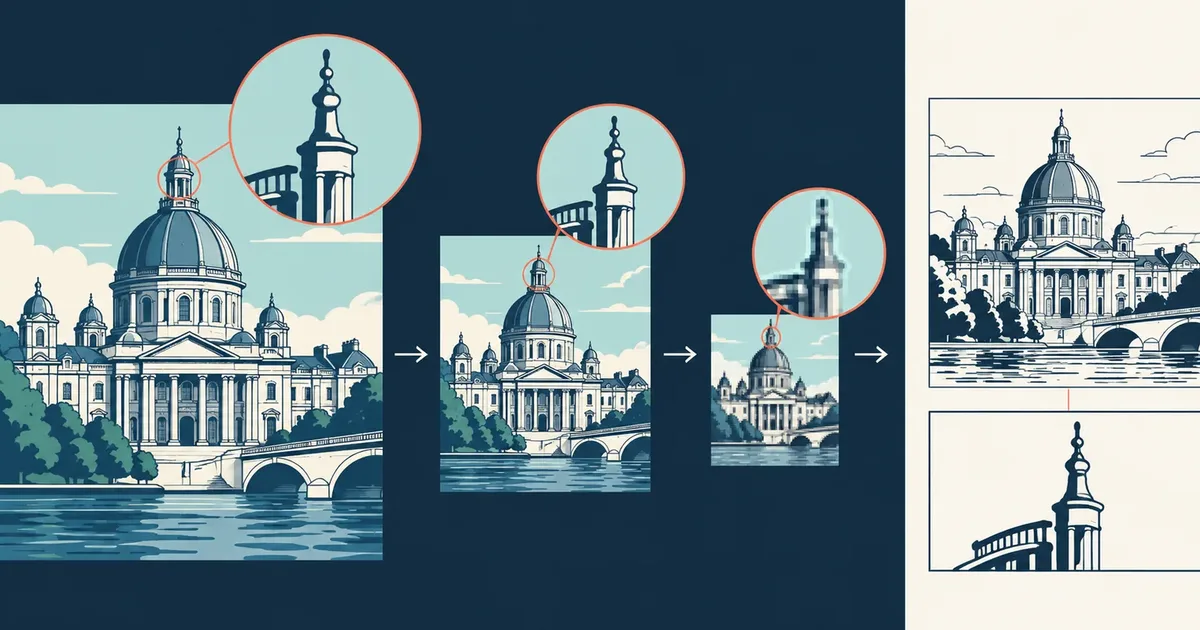
A responsive website may serve an original asset, a smaller rendition, or a thumbnail. Converting the smallest copy to another format does not restore the character edges removed during resizing or compression.
Upload WebP directly when it contains readable document or interface text; converting formats first cannot restore details already lost to compression. A PNG made from a compressed thumbnail contains the same damaged character shapes in a different wrapper.
Best option when it retains the intended pixel dimensions and text detail.
Usable when the browser did not request a smaller responsive variant.
Last resort because resizing may have merged thin strokes and punctuation.
There is no required conversion step. Preserve the original asset, select a layout that matches its scattered or continuous text, and inspect the smallest labels first.
Choose the original web asset instead of a thumbnail. OCR depends on character pixels, not the file format label.
Look for ringing, block edges, or softened strokes around small text. A higher-resolution source is more useful than converting the same image to PNG.
Web graphics may place light text over photographs or gradients. Crop to the text region when the background competes with character edges.
The OCR tool reads WebP directly. Create another image format only when a separate application cannot accept the original file.
Compression damage is easiest to see around small high-contrast characters. Recognition may still return fluent words, so inspect the pixels instead of judging the output by readability alone.
Letters such as c and e begin to close or resemble one another.
Light or dark ripples appear around text placed on a sharp background.
Periods, commas, colons, and decimal marks fade or merge into nearby pixels.
Read What Is OCR? A Practical Guide to Optical Character Recognition to understand why recognition can interpret remaining pixels but cannot recover removed strokes.
To understand what recognition can recover from the available pixels, start with the OCR basics collection.
Original WebP assets containing document, product, interface, caption, or label text.
Undoing lossy compression or improving a thumbnail by converting it to another format.
Soft character edges, ringing artifacts, gradient backgrounds, and very small web text.
TXT and Markdown provide portable text without converting the image first. Keep JSON or CSV when small web text and compression artifacts require a closer diagnostic review.
No. This route accepts WebP directly, so converting to PNG or JPG adds a step without restoring lost detail. See why OCR depends on source pixels rather than the file label.
No. OCR predicts characters from the pixels that remain; it cannot recover strokes removed by resizing or lossy compression. Review the source-quality checklist.