
Original OCR
Extract text from the first source.
OCR document comparison extracts text from two scanned files and highlights line-level additions and deletions. A reported difference can come from a real edit or an OCR error, so compare each important change with both source documents.
A highlighted difference may be a real edit or a recognition difference. Verify important changes in both source documents.
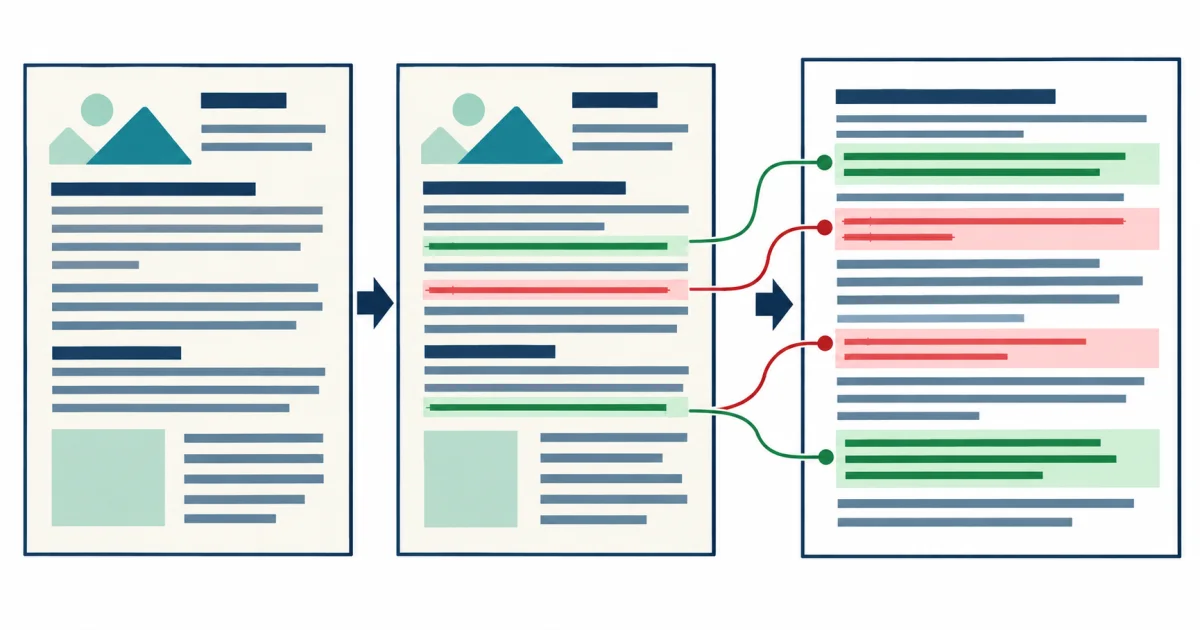
Both files pass through recognition before comparison. The report makes text differences visible, but the original images remain the authority for deciding whether a change is real.
Use this tool to locate candidate wording changes between two scans without treating OCR differences as proof of revision. The system compares recognized text, so every flagged change has two possible causes: the document changed, or recognition differed.
Extract text from the first source.
Extract text from the second source using the same settings.
Check every consequential difference in both images.
Unequal page ranges, rotation, resolution, or cropping can create a report dominated by OCR noise instead of meaningful revisions.
Compare corresponding pages and remove unrelated covers or appendices.
Similar resolution, orientation, and contrast reduce recognition-only differences.
Prioritize amounts, dates, duties, names, identifiers, and negations.
Save both originals with the report so every flagged change can be checked later.
A paragraph moved elsewhere can appear as one deletion and one addition even when its wording remains the same.
Inspect unchanged lines around a difference because a single altered word may depend on the sentence, heading, or clause around it.
Review amounts, dates, names, duties, negations, identifiers, and reordered clauses before punctuation or repeated page furniture. Use OCR vs Manual Transcription as a Risk-Based Decision to set the review boundary.
For reliable comparison and review thresholds, use the OCR accuracy and confidence guides.
Revised scanned agreements, policies, notices, forms, and archived page images.
Proving authenticity, legal redlining, or pixel-perfect image comparison.
Numbers, names, negations, reordered paragraphs, and changes caused by unequal scan quality.
No. It identifies a text difference between OCR results. Verify it in both source files. Set the human review boundary.
You can, but blur, rotation, or compression in one file may create misleading differences. Prepare comparable sources.